
ChatGPT with Photos — Ask About Any Image

Upload a photo and ask anything about it: ChatGPT reads text, describes what's in the picture, explains a diagram or translates a sign. Right in your browser.
Home

/

Tools

/

ChatGPT with Photos

Caps remaining: 0 CAPS
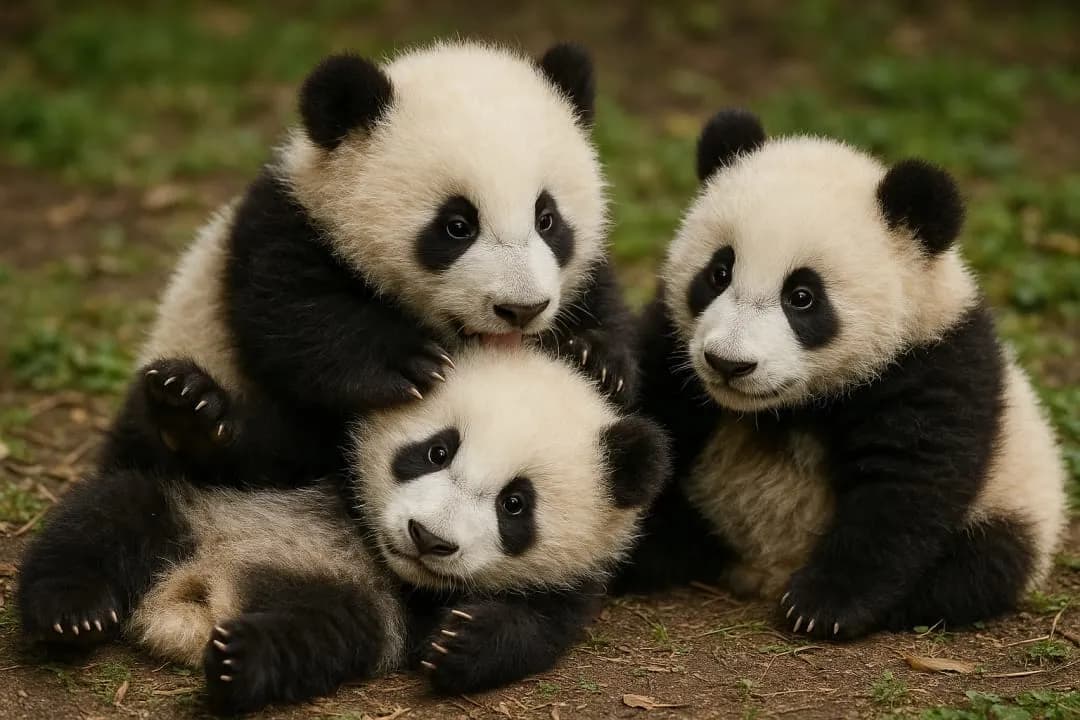
Who is in the photo and roughly how many months old are they? What do they eat at this age? Keep it short.

Who is in the photo and roughly how many months old are they? What do they eat at this age? Keep it short.

Three giant panda cubs, roughly 4–6 months old—though it’s hard to tell from a photo. At this age, they mainly drink their mother’s milk and may start tasting bamboo.

A real answer from GPT-5.6 Luna to this photo

How to Ask a Question About a Photo

star
1

Upload a photo

Drag an image into the window or choose a file — a phone photo or a screenshot will do.

star
2

Ask a question

Ask in your own words or pick a ready-made scenario.

star
3

Choose a model

GPT, Claude and Gemini all understand images — compare their answers.

star
4

Refine the answer

Continue the chat: ask for more detail, a shorter answer or a different take.

What You Can Ask About a Photo

Extract text

A document, receipt or sign — get text you can copy.

Work through a problem

A photo of a textbook problem — a solution explained step by step.

Describe a photo

What's in the picture, where it was taken, which dog breed or plant species it is.

Translate a sign

A menu, manual or sign in a foreign language — translated into English.

More tools

More tools

Solve by Photo
Take a photo of a problem — get a solution with an explanation.
Text
Improve Photo Quality
Sharpen, remove noise and restore an old photo.
Image
AI Translator
Translates text and photo captions while keeping the meaning and tone.
Text

Still have questions?

Upload an image to the chat window above, type your question and send the message. The model will read the image and reply in the chat — you can continue the conversation and ask follow-up questions.

Phone photos, screenshots and document scans all work. The sharper the photo and the larger the part you need, the more accurate the answer: the model may misread small or blurry text.

The model usually reads legible handwriting. If the handwriting is messy or the photo is blurry, mistakes are possible — check the result and ask the model to double-check any doubtful words.

Yes. Take a photo of the whole problem and ask for a solution with an explanation — the model will recognize the problem and work through it step by step. It's worth checking the answer: AI can make mistakes, especially in long calculations.

GPT, Claude and Gemini models all understand images — you can switch models right in the chat. A fast model is enough for simple questions; for complex diagrams, documents and problems, try a more powerful one and compare the answers.

The price depends on the model and the size of the request: you pay for question, image and answer tokens, which are deducted in Caps. You pay only for actual usage — model prices and plans are listed in the “Pricing” section.

Technical Support

ChatGPT with Photos Online

Current versions of ChatGPT understand images: from a photo they can read text, explain a diagram or chart, describe an object and answer questions about the picture. On BotHub, it works right in your browser with no separate OpenAI subscription.

Besides GPT, Claude and Gemini can also answer questions about photos — switch models and compare their answers. You pay only for the tokens you use.

Top left shadowRight bottom shadow
Ask AI About a PhotoGet an answer seconds after uploading
  • GPT, Claude and Gemini in one window
  • Works right in your browser
  • Pay as you go with Caps
  • Pay only for actual usage
Upload photo