
AI Text and Photo Translator Online

Translate texts, documents and text in photos: AI keeps the meaning and tone and reads text from images on its own. Spanish, Chinese, German and many more.
Home

/

Tools

/

AI Translator

Caps remaining: 0 CAPS
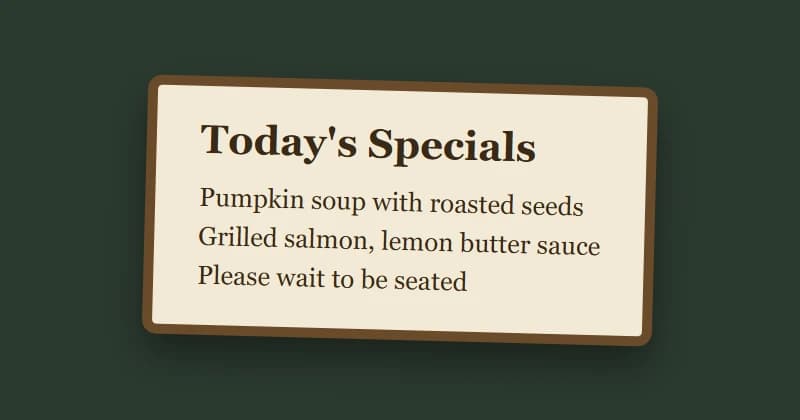
Translate all the text in the photo into Spanish. Show the original first, then the translation.

Translate all the text in the photo into Spanish. Show the original first, then the translation.

Original
Today's Specials
Pumpkin soup with roasted seeds
Grilled salmon, lemon butter sauce
Please wait to be seated
Traducción al español
Especialidades de hoy
Sopa de calabaza con semillas tostadas
Salmón a la parrilla con salsa de mantequilla y limón
Por favor, espere a que le asignen una mesa.

A real answer from GPT-5.6 Luna to this photo

How to Translate Text or a Photo

star
1

Add text or a photo

Type the text or attach an image — right in the chat window.

star
2

Choose the language

The model detects the source language itself — just say which language to translate into.

star
3

Get the translation

For photos, AI first shows the recognized original, then the translation.

star
4

Adjust the style

Ask for a shorter, more polite or more formal version.

What the AI Translator Can Do

Photo translation

Menus, signs, manuals and screenshots — the text is recognized automatically.

Texts and documents

Emails, articles and contracts — with consistent terminology.

The right tone

Ask for a more formal or simpler translation, or one that sounds like a native speaker.

Explanations

AI will explain idioms and word choices if you ask.

More tools

More tools

ChatGPT with Photos
Upload an image and ask a question: extract text, describe, translate.
Text
Solve by Photo
Take a photo of a problem — get a solution with an explanation.
Text
Paraphrase Text
Rewrites text in new words while keeping the meaning — in the tone and length you need.
Text

Still have questions?

Attach an image in the chat window above and ask for a translation. AI will recognize the text in the photo and show the original and the translation. No separate text recognition app is needed.

The models translate between widely used languages: English, Chinese, Spanish, German, French and many others. You don't have to specify the source language — the model detects it itself. Translations from rare languages and dialects may be less accurate and are worth double-checking.

AI understands context: it translates idioms by meaning, keeps terminology consistent and adapts the tone to the task. You can ask for a more formal or simpler translation and for an explanation of why a particular word was chosen.

Yes: paste the text into the input field or send a photo of the page. Long documents are easier to translate in parts — ask the model to keep the terms from previous parts so the translation stays consistent.

The text structure is preserved: paragraphs, lists and headings — as in the example above, where the translation follows the lines of the original. Document styling — fonts, colors and layout — is not carried over: the answer arrives as text in the chat.

Technical Support

AI Translator Online: Text and Photos

Unlike regular translators, AI understands context: it translates idioms by meaning, keeps terminology consistent and adapts the tone to the task — an email to a colleague, a contract or a social media post.

To translate a photo, you don't need a separate OCR tool: upload a picture of a menu, sign or manual, and the model will recognize the text and translate it on its own.

Top left shadowRight bottom shadow
Translate with AIText or photo — translated in seconds
  • Translate text and photos
  • Context and the right tone
  • Works right in your browser
  • Pay as you go with Caps
Translate